
Accept Payments Anywhere with Your iPhone
Transform your iPhone into a complete payment solution. No additional hardware needed. Accept debit and credit cards, Apple Pay, and other digital wallets — all with the security of iPhone.
Why Tap to Pay on iPhone?
No Payment Terminals Needed
Accept in-person payments with only your iPhone. No card readers, dongles, or extra hardware to buy or carry.
Contactless Transactions
Customers simply tap their card or device at the top of your iPhone. Fast, modern, and touch-free.
Accept All Payment Types
Debit cards, credit cards, Apple Pay, Google Pay, and other digital wallets. Your customers choose how they pay.
Secure & Private
Every transaction is encrypted and processed with the built-in security of iPhone. Card numbers are never stored on your device.
How Tap to Pay Works
Accept payments with Tap to Pay on iPhone through BrightStar's mobile banking app in four simple steps.
1. Enable
Open your BrightStar mobile banking app on your iPhone and enable Tap to Pay on iPhone.
2. Enter Amount
Enter the amount to be paid, then present your iPhone to the customer.
3. Customer Taps
Your customer holds their card or device at the top of your iPhone, over the contactless symbol.
4. Done
When you see the "done" checkmark, the transaction is complete. It's that simple.
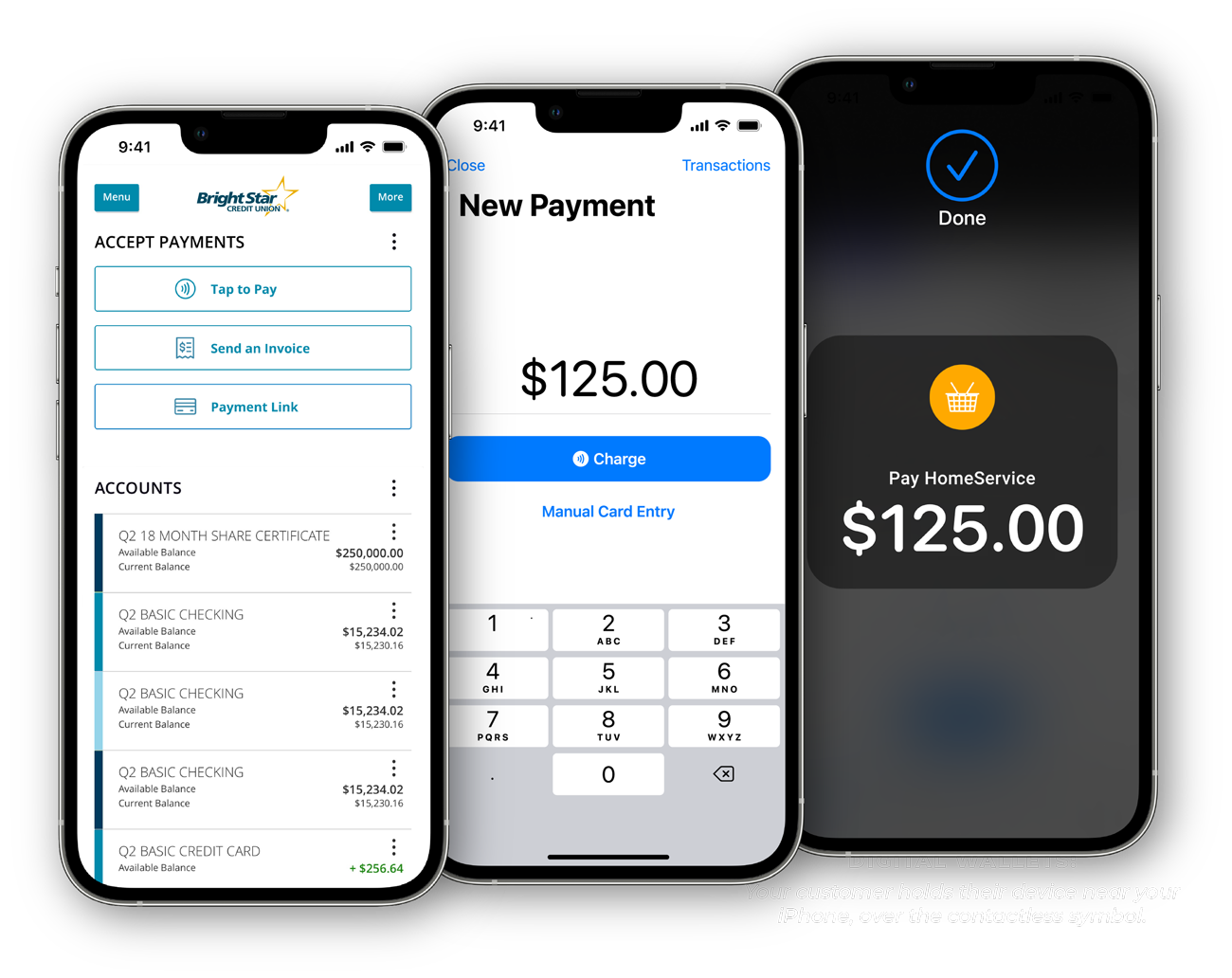
Get Paid On the Go
Tap to Pay on iPhone allows you to run your business or nonprofit from anywhere. All it takes are a few simple steps and your iPhone.
More Than Just Payments
Autobooks through BrightStar gives you a complete suite of tools to manage your business finances.
Send Invoices
Create and send professional invoices to your customers. Get paid online with a secure payment link.
Track Payments
See which invoices are paid, pending, or overdue. Know exactly where your money stands at all times.
Manage Cash Flow
All your payment activity in one place. Simplify bookkeeping and spend less time on accounting.
Perfect For
Small Businesses — Retailers, service providers, and pop-up shops
Nonprofits — Accept donations and event payments on the spot
Freelancers — Collect payments from clients wherever you meet
Market Vendors — Accept cards at farmers markets, craft fairs, and festivals
Mobile Services — Landscapers, cleaners, and contractors on the go
Professional Services — Consultants, tutors, and personal trainers
*Requires an internet or cellular connection and an iPhone Xs or later with iOS 15.5 or later. The Contactless Symbol is a trademark owned by and used with permission of EMVCo, LLC. Apple, iPhone, and Apple Pay are trademarks of Apple Inc., registered in the U.S. and other countries.
Tap to Pay & Autobooks Questions, Answered
Find answers to common questions about our checking accounts and services.
Showing of questions
Contact us
No questions match your search
Start Accepting Payments Today
Turn your iPhone into a payment terminal. No extra hardware, no complicated setup — just tap and go.